The following is a step-by-step lesson on how to use ActiveX in Delphi
Specification of the sample program:
Acquire voltage signal between -10 to 10V via Channel 1 of DI-194 at a rate of 240 Samples/second
The data is streamed back to the PC via COM 1
The input signal is displayed on a scrolling waveform window
The following steps show you how to program the DI-194 under Delphi 5.
1) Start Delphi, and follow Component -> Import ActiveX control ..., and you will see:
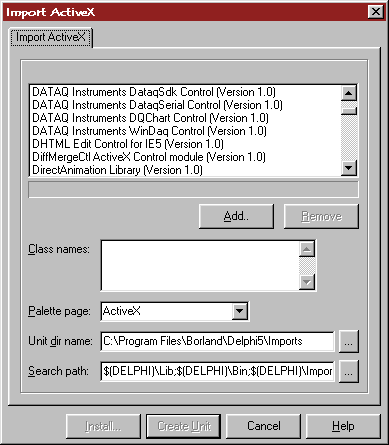
2) In the Import ActiveX dialogue box, select XChart from Ultimaserial
3) Click the Install button, then OKs to install XChart control to ActiveX tab to be used in Step 7)
4) Repeat 1) to 3) to install UltimaSerial control to ActiveX tab to be used in Step 7).
5) Enable Component Palette if it is not on the toolbar of Delphi

6) If you like, you can restart Delphi to have clean form. (You don't need to save anything at this point)
7) On the new form, add XChart and UltimaSerial from the ActiveX tab. Make sure XChart's object name is XChart1, and UltimaSerial's object name is UltimaSerial1.
8) Add two buttons from the Standard tab and name them Start and Stop. Make sure Start button is object Button1 and Stop button is object Button2 so that we can use our sample codes directly.
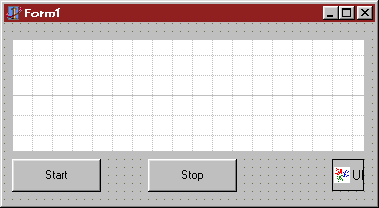
9) On the form, double click on Start and Stop buttons to create the codes for them
10) In the Object Inspector, select UltimaSerial1, and add the name "NewData" for the event NewData
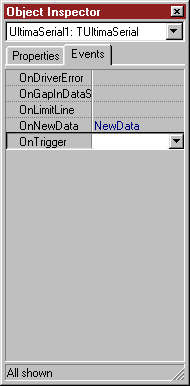
11) In the code editor, change the default codes
From:
unit Unit1;
interface
uses
Windows, Messages, SysUtils, Classes, Graphics, Controls, Forms, Dialogs,
StdCtrls, ULTIMASERIALLib_TLB, OleCtrls, XCHARTLib_TLB;
type
TForm1 = class(TForm)
XChart1: TXChart;
UltimaSerial1: TUltimaSerial;
Button1: TButton;
Button2: TButton;
procedure Button1Click(Sender: TObject);
procedure Button2Click(Sender: TObject);
procedure NewData(Sender: TObject; Count: Smallint);
private
{ Private declarations }
public
{ Public declarations }
end;
var
Form1: TForm1;
implementation
{$R *.DFM}
procedure TForm1.Button1Click(Sender: TObject);
begin
end;
procedure TForm1.Button2Click(Sender: TObject);
begin
end;
procedure TForm1.NewData(Sender: TObject; Count: Smallint);
begin
end;
end.To: (Watch for the blue text)
unit Unit1;
interface
uses
Windows, Messages, SysUtils, Classes, Graphics, Controls, Forms, Dialogs,
StdCtrls, ULTIMASERIALLib_TLB, OleCtrls, XCHARTLib_TLB;
type
TForm1 = class(TForm)
XChart1: TXChart;
UltimaSerial1: TUltimaSerial;
Button1: TButton;
Button2: TButton;
procedure Button1Click(Sender: TObject);
procedure Button2Click(Sender: TObject);
procedure NewData(Sender: TObject; Count: Smallint);
private
{ Private declarations }
public
{ Public declarations }
end;
var
Form1: TForm1;
implementation
{$R *.DFM}
procedure TForm1.Button1Click(Sender: TObject);
begin
UltimaSerial1.Device:=194;
UltimaSerial1.CommPort:=1;
UltimaSerial1.EventLevel:=1;
UltimaSerial1.ChannelCount:=1;
UltimaSerial1.SampleRate:=240;
UltimaSerial1.Start();
end;
procedure TForm1.Button2Click(Sender: TObject);
begin
UltimaSerial1.Stop();
end;
procedure TForm1.NewData(Sender: TObject; Count: Smallint);
begin
XChart1.Chart (UltimaSerial1.GetData());
end;
end.12) Now you can run the program by following Run->Run, or simply hitting F9 key!
Note: Some Delphi users claim that there is a problem in the charting control, XChart. It has trouble understanding the variant returned by UltimaSerial. Change the chart section to the following will make it work. (I can't verify this finding, yet the following codes should work fine)
procedure TForm1.NewData(Sender: TObject; Count: Smallint);
var MyData: array[0..1000] of Smallint;
begin
UltimaSerial1.GetDataEx(MyData[0],Count);
XChart1.ChartEx(MyData[0], 1, Count);
end;
Last update: 03/14/22
Copyright: 2000-2005 www.UltimaSerial.com