UltimaMeter is an instrumentation analog meter (angular gauge) display ActiveX control specifically designed for data acquisition applications.
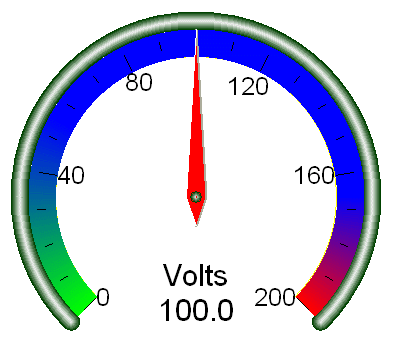
It is installed along with WinDaq Add-ons, and used by Instrumentation Gauge WinDaq add-on (See video demo below)
Installation:

A VB6 project Ultimameter can be found in the Windaq add-on directory. If you wish to use other languages, please check this out.
License:
Freeware
Starting 2017, you can use this utility to remove the adline yourself
32 or 64-bit?
All UltimaSerial ActiveXs are 32-bit components, you must select 32-bit code option when using 64-bit compilers. Both 32-bit and 64-bit Windows runs 32-bit applications properly.
Properties
-
short StartDegree: Start point in degree, which must be smaller than StopDegree (default: 225)
-
short StopDegree: Stop point in degree, which must be larger than StartDegree (default: 315)
Example Settings 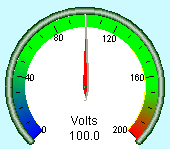
Start =225 Stop=315
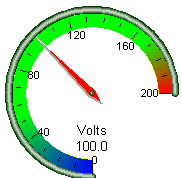
Start=270 Stop=360
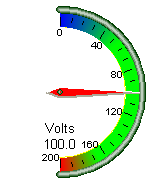
Start=90 Stop=270
-
double MaxValue: The maximum value of the meter
-
double MinValue: The minimum value of the meter
-
short MainTick: Number of main ticks
-
short SubTick: Number of sub ticks between two main ticks
-
double Value: Needle position. If any setting is changed, the meter will be redrew first.
-
BSTR Unit: Specifies the unit to be displayed
-
long Adjustment (short index): Adjustment
Index 0 Horizontal offset for the meter center 1 Vertical offset for the meter center 2 Number of digits after decimal point to be displayed for Value 3 Number of digits after decimal point to be displayed for the tick annotations 6 Numerator of the meter ratio 7 Denominator of the meter ration 8 Reset min/max retainers 9 Enable (1) or disable (0) min/max retainers, see below
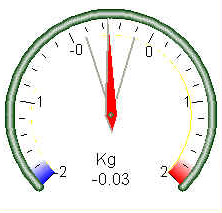
10 Length of the retainer needles in percentage of the gauge diameter Others Reserved -
BSTR Key:
-
Enter command Keys
-
Control the font size for the numbers
-
Command key format is "@, <size-divisor>"
-
The default divisor is 6, a positive number should be used here
-
Example:
UltimaMeter.Key ="@,10" --- make the font smaller
-
-
-
Enter the registration key.
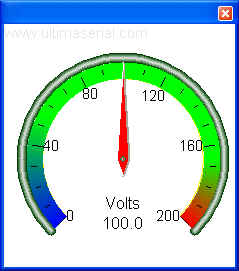
Until UltimaMeter is paid-registered, it will display the watermark of "www.ultimaserial.com" in the upper left corner (see below)
-
-
Boolean ShowColorBand: Enable or disable the color limit band
-
OLE_COLOR Palette (short index):
Index 0..3599 Specifying the color for each matching limit.
ymax = 360
ylo = 100
yhi = 300
For i = 0 To ymax
If i < ylo Then
BLUE = C255 - Int((c256 * i) / ylo)
GREEN = Int((c256 * i) / ylo)
RED = 0
Else
If (i >= yhi) Then
BLUE = 0
GREEN = C255 - Int(((i - yhi) * C255) / ((ymax - yhi)))
RED = Int(((i - yhi) * C255) / ((ymax - yhi)))
End If
End If
UltimaMeter1.Palette(i) = BLUE * C65536 + GREEN * c256 + RED
Next10000 Color for the gauge needle 10001 Color for the meter ring edge 10002 Color for the meter ring center 10003 Color for the number and text 10004 Color for the meter face 10008 Color for the min retainer 10009 Color for the max retainer Others Reserved -
double LimitBand (short index): Specifying the limit for each matching color band. Up to 3600 limits can be specified.
ymax=360
UltimaMeter1.LimitBand(i) = ((UltimaMeter1.MaxValue - UltimaMeter1.MinValue) / ymax) * i + UltimaMeter1.MinValue
Next
UltimaMeter1.LimitBand(ymax) = UltimaMeter1.MaxValue 'This is a must to indicate the end of limit bands!
Methods
-
ReDraw: Redraw the meter face
Events:
-
Click ()
-
DblClick ()
-
MouseDown (Button As Integer, Shift As Integer, X As Single, Y As Single)
-
MouseUp ((Button As Integer, Shift As Integer, X As Single, Y As Single)
-
MouseMove (Button As Integer, Shift As Integer, X As Single, Y As Single)
-
MouseWheel (nFlags as long, zDelt as short, X as long, Y as long)
.NET users:
Last update: 07/26/24
© www.ultimaserial.com