The following is a lesson on how to use ActiveX in Visual Basic 2008 Express Edition, which can be downloaded for free from Microsoft's website.
Note: If you wish to use Visual Basic 2008 Express Edition (VB2008)'s upgrade wizard to upgrade the VB6 examples provided in the installations of Ultimaserial, UltimaWaterfall and XChart, check this out
32 or 64-bit?
Most ActiveXs are 32-bit components, you must select 32-bit code option when using 64-bit compilers. Both 32-bit and 64-bit Windows runs 32-bit applications properly.
 Here is an
example based on DATAQSDK
Here is an
example based on DATAQSDK
You may download VB2008 projects for reference
In this lesson, we will use Ultimaserial ActiveX to develop a data acquisition application with DATAQ's Starter kit, here we use DI-158.
-
Start Visual Basic 2008 Express Edition
-
Select Create: Project...
-
From the Visual Studio installed templates, select Windows Forms Application to create a new project
-
The studio will create Form1.vb for you
-
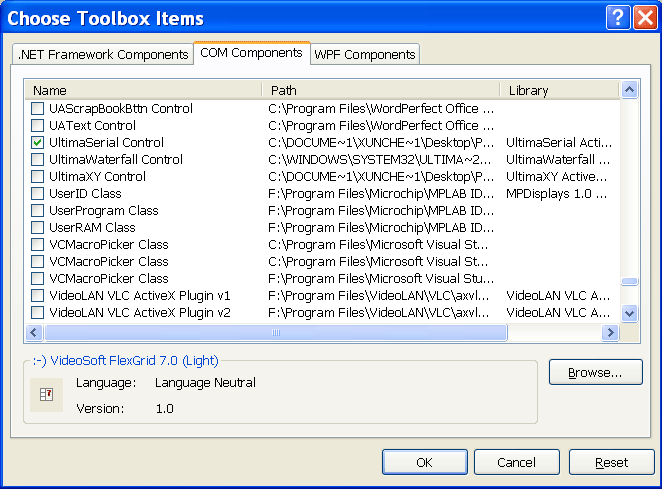
Right-click inside the toolbox pane and follow Choose Items...
-
Select Ultimaserial and XChart under the COM Components tab
-
Add XChart and Ultimaserial to the form
-
Add two buttons to the form, one call Start, the other Stop
-
Add four labels (label 1,2,3,4) to display the readings in two different approaches, one via direct access to the data array, the other via calls to AnalogInput()
-
Double click on both buttons, XChart and Ultimaserial to enter the source editor of Form1.vb
-
Make sure your code is similar to the following:
Public
Class Form1 Dim v(,) As Short Private Sub AxUltimaSerial1_NewData(ByVal sender As Object, ByVal e As AxULTIMASERIALLib._DUltimaSerialEvents_NewDataEvent) Handles AxUltimaSerial1.NewData
v = AxUltimaSerial1.GetData
AxXChart1.Chart(v)
Label1.Text = AxUltimaSerial1.AnalogInput(ULTIMASERIALLib.enumAChn.Ch1)
Label2.Text = AxUltimaSerial1.AnalogInput(ULTIMASERIALLib.enumAChn.Ch2)
Label3.Text = v(0, 0)
Label4.Text = v(1, 0)
End Sub Private Sub StartButton_Click(ByVal sender As System.Object, ByVal e As System.EventArgs) Handles StartButton.Click
AxUltimaSerial1.ChannelCount = 2
AxUltimaSerial1.set_PChannel(0, ULTIMASERIALLib.enumChn.Ch01_SE)
AxUltimaSerial1.set_PChannel(1, ULTIMASERIALLib.enumChn.Ch02_SE)
AxUltimaSerial1.Device = 158
AxUltimaSerial1.CommPort = 0
AxUltimaSerial1.SampleRate = 100
AxUltimaSerial1.EventLevel=1
AxUltimaSerial1.Start()
End Sub Private Sub StopButton_Click(ByVal sender As System.Object, ByVal e As System.EventArgs) Handles StopButton.Click
AxUltimaSerial1.Stop()
End SubEnd
Class -
Run it and it should plot the input waveform on the chart and print readings from the two channels on the text labels. Some users report that NewData event may not fire under certain Windows configuration. If you suspect this is what happened to you, please use Timer function to retrieve the data instead: Add a timer to the form, set its resolution to 10, enable it when Start button is pushed and disable it when Stop button is pushed. Copy the codes in NewData event to Timer1_Tick event
-
If you need to access the data returned by GetData, access them directly via v(x,y), where x is the channel index, y is the data index
Last update: 11/18/16
© www.ultimaserial.com