DATAQ Windaq Waveform Browser (WWB) Audio Commented Event Navigator
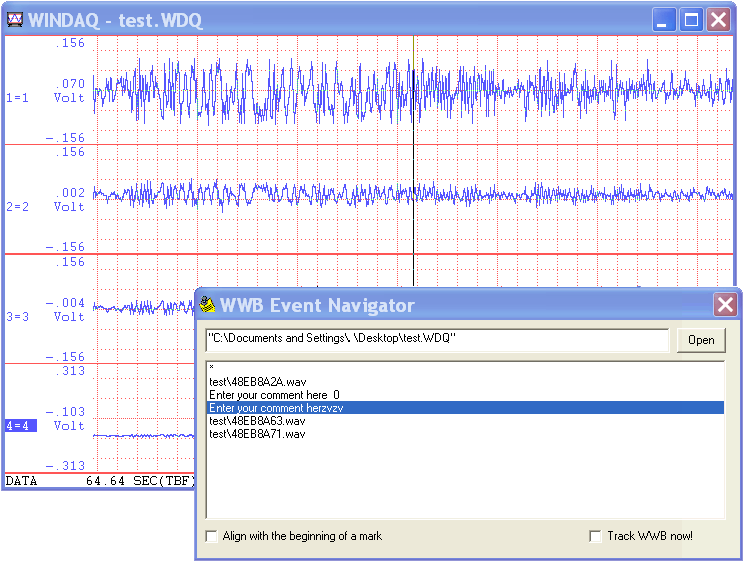
This is the advanced event managing center for WWB to synchronize the analog waveform recorded in Windaq and its audio/text comments. You can click on an event to jump to the specific location of a waveform when the event for inserted. If the event has audio comment created by Advanced Event , it will play back the audio comment. When WWB tracking option is checked, it follows the cursor movement of WWB and highlight/playback the comments when the cursor is on an event.
Due to its nature of being an utility for WWB, it is normally installed as a hidden add-on. Please use Windaq Add-on Manager to add it to Windaq's menu if you wish to invoke it from WinDaq Acquisition Software's add-on menu
Features of
Windaq Waveform Browser (WWB) Event
Navigator:
- Easy access to commented event markers: Unlike WWB's event markers' dialogue box, you don't need to close the dialogue box to move the cursor to the even marker.
- Click on an audio comment, it will move the cursor on WWB as the audio comment is played back
- If EarlyMark is checked, instead of move WWB cursor to the time of the text comment is inserted, it will move the WWB cursor to the location when you start to type in the text comment
- If Track WWB is checked, when you study the waveform in WWB, it will highlight the comment when the cursor is in the region of a comment. If the comment is audio-based, it will start to play back the comment based on the location of WWB cursor.
Notes:
- Since Windaq Waveform Browser (WWB) doesn't provide portal for
add-ons, this application is listed under Windaq acquisition
software. There are two ways to start this applications:
- If you are using Windaq acquisition software, you can start it from its add-on sub menu
- Or, you can run the shortcut WWB Event Navigator under Windows->Start->Windaq group
- Due to the exclusive nature of the WWB link engine, only one copy of WWB FFT Viewr or WWB Advanced Event Navigator can be opened at any time
- If a Wdq file is being acquired to by Windaq Acquisition software, it should be closed first before it can be opened by WWB Event Navigator
- Non-standard HiRes and packed Pro+ Windaq files are not supported at this moment
- If .wdq file extension is not associated with WwbEventNavigator, you can start this program from Windaq\AddOn\WwbEventNavigator short cut
- Bonus for users with paid registration: No
ad-line in event comment box
Menu Name Appeared under WinDaq->View->Add-ons
WWB Event Navigator
Last update: 07/22/24
Copyright: 2000-200
9 www.UltimaSerial.com