FFT Viewer for Windaq Waveform Browser (WWB)
FFT Viewer for Windaq Waveform Browser is a live FFT viewer for WWB to display up to 16 WWB analog channels in the frequency domain. The display is synchronized to its counter part under WWB.
Due to its nature of being an utility for WWB, it is normally installed as a hidden add-on. Please use Windaq Add-on Manager to add it to Windaq's menu if you wish to invoke it from WinDaq Acquisition Software's add-on menu
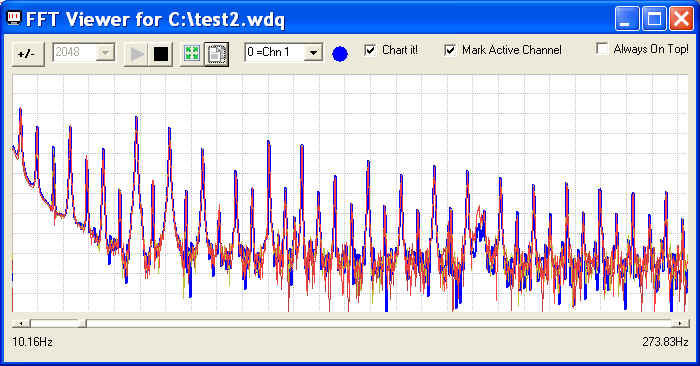
Features of FFT Viewer for Windaq Waveform Browser:
-
Supported FFT sizes: 512, 1024, 2048, 4096, 8192, 16384 and 32768
-
Up to 16 WWB channels can be monitored at the same time
-
The FFT frame starts at the WWB cursor point
-
All important configurations are retained at the end of a session for easy reopening
-
BestFit button brings the active channel to full screen display
Notes:
- Since Windaq Waveform Browser (WWB) doesn't provide portal for
add-ons, this application is listed under Windaq acquisition
software. There are two ways to start this applications:
- If you are using Windaq acquisition software, you can start it from its add-on sub menu
- Or, you can run the shortcut WWB FFT Viewer under Windows->Start->Windaq group
- Due to the exclusive nature of the WWB link engine, only one copy of WWB FFT Viewr or WWB Advanced Event Navigator can be opened at any time
- If a Wdq file is being acquired to by Windaq Acquisition software, it should be closed first before it can be opened by WWB FFT Viewer
- The WinDaq Waveform Browser used by FFT Viewer is c:\dataq\windaq32.exe by default. If you wish to use another copy of WWB installed in a different directory, please edit WWBFFT.INI under Windows directory and change the key WWBPath. For example, if your preferred WWB is F:\Windaq\Windaq32.exe, you should change the key from WWBPath=c:\dataq\WINDAQ32.EXE to WWBPath=F:\Windaq\WINDAQ32.EXE
- Non-standard packed Pro+ WinDaq files, .WDC and .WDH are not supported at this moment
7030
Menu Name Appeared under WinDaq->View->Add-ons
WWB FFT Viewer
Last update: 01/26/24
© www.UltimaSerial.com