UltimaSerial

Once you install UltimaSerial ActiveX control (usually done through the installation of DATAQ's WinDaq Resource CD), the following Excel sample programs can be found in the sub directory. (Delphi, LabView, VC, TestPoint and VB programs are covered in other pages).
 Since the sample program were
originally developed for DI-194, please come to the eLessons if this is your
first time to use ActiveX control in Excel or have trouble
interfacing the newer USB-based devices.
Since the sample program were
originally developed for DI-194, please come to the eLessons if this is your
first time to use ActiveX control in Excel or have trouble
interfacing the newer USB-based devices.
Note1: Microsoft Excel 2000 is needed to use these sample programs. To view the codes of an Excel VBA sample, please follow (Excel)Tools->Macro->Visual BASIC Editor.
Note 2: To test the above programs, you must enable the macros when opening the Excel spreadsheet.
Note 3: For your convenience, the sample programs listed in this page will not create any extra add-ins, or menu item, on the menu bar of Excel.
Note 4: I strongly suggest you take a look at the VisualBASIC samples. You will learn a lot from them and they are very easy to convert to Excel VBA. If you are new to ActiveX programming, please take a look at the Easy Steps to Data Acquisition in VisualBASIC, it will help you to start your own Excel VBA program.
AnalogSingle:
acquires and displays the data from channel 1as a scrolling waveform. When you push the
button "Acquire Data", the latest reading from Analog
Channel 1 (If you need to read from more than one channel, click here) , TransitionCounter
0 , Digital Input 0 and the Computer Clock will
be send to Excel. 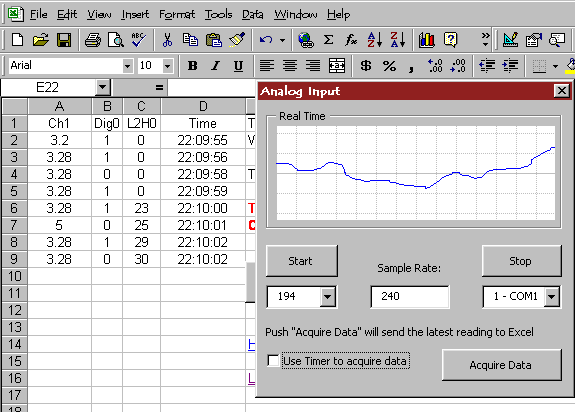 Click here for
a screen shot!
Click here for
a screen shot!
If you are using Excel 2000, please try to disable "Use Timer to Acquire Data" so that the waveform will scroll smoother.
Properties/methods/events:
UltimaSerial.Device, UltimaSerial.CommPort, UltimaSerial.ChannelCount, UltimaSerial.SampleRate, UltimaSerial.Start, UltimaSerial.Stop, UltimaSerial.GetData, UltimaSerial.NewData, and UltimaSerial.EventLevel
AnalogWaveform: acquires and displays the data from channel 1 as a scrolling waveform. The waveform is sent to the first column of the spreadsheet continuously.
If you are using Excel 2000, please try to disable "Use Timer to Acquire Data" so that the waveform will scroll smoother.
Properties/methods/events:
UltimaSerial.Device, UltimaSerial.CommPort, UltimaSerial.ChannelCount, UltimaSerial.SampleRate, UltimaSerial.Start, UltimaSerial.Stop, UltimaSerial.GetData, UltimaSerial.NewData, and UltimaSerial.EventLevel
AnalogTrigger:
The trigger condition is: Analog channel 1 crosses 0V on a rising edge. Samples will be
acquired before and after the trigger point. Before trigger condition is met, a
continuous scrolling waveform is displayed on a separate window. When the trigger
condition is met, the waveform will be frozen, and a pre-specified number of samples
before and after the trigger point will be sent to the first column of the spreadsheet for
further calculation. 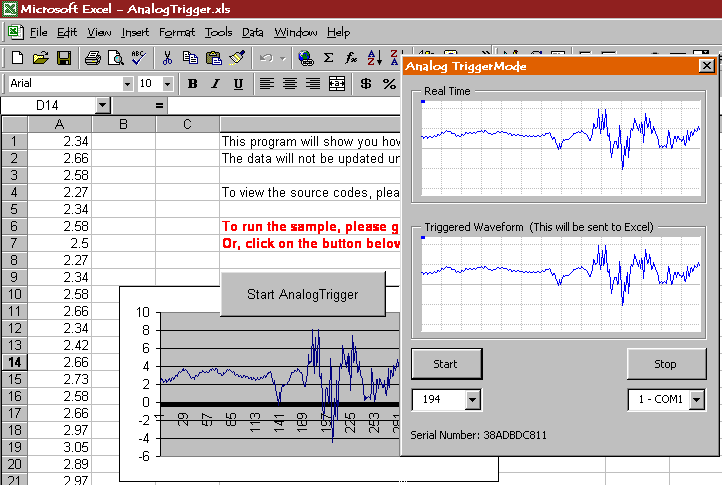 Click here
for a screen shot!
Click here
for a screen shot!
Properties/methods/events:
UltimaSerial.Device, UltimaSerial.CommPort, UltimaSerial.ChannelCount, UltimaSerial.SampleRate, UltimaSerial.Start, UltimaSerial.Stop, UltimaSerial.TriggerChannel, UltimaSerial.AcquisitionMode, UltimaSerial.TriggerLevel, UltimaSerial.PreTriggerLength, UltimaSerial.PostTriggerLength, UltimaSerial.TriggerStatus, UltimaSerial.MapErrorMessage, UltimaSerial.GetData, UltimaSerial.GetDataFrame, UltimaSerial_DriverError, UltimaSerial.NewData, UltimaSerial.EventLevel
Last update: 02/24/12
Copyright: 2000-2005 www.UltimaSerial.com